


Baltimore Sun
2.7157.00 Reviews
App Specs
- Version
- 10.0.60
- Updated On
- License
- Free
- Downloads
- 50,000+
- Developer
- Tribune Publishing Inc.
- Categories
- News & Magazines
- Platform
- Android
Screenshots
 Analysis by AppCompare
I approached the Baltimore Sun as a reader deciding whether a local newspaper app belongs in my daily routine, not as a replacement for every news source I use. Its appeal is clearest when I want Baltimore-area reporting close at hand. The key question is value: the app is free to download, but some of the journalism it offers sits behind a subscription, so I would weigh the free experience before deciding whether paid access makes sense for me.
What the free download does—and does not—settle
The app is free, which makes trying it a low-commitment way to see whether its coverage and reading experience suit you. That does not mean every article is free to read. It offers in-app purchases ranging from $1 to $199.99 per item, so there are paid options, but those figures alone do not tell me which plan or purchase is right for a particular reader. I would check the terms shown in the app before confirming anything and make the decision based on the access being offered there.
That distinction matters more than the word “free.” If you mainly want to browse the available coverage and judge whether Baltimore-focused reporting is useful to you, installing it costs nothing. If your goal is regular access to material that requires payment, the real value depends on the specific subscription or purchase presented to you, how often you read, and whether you prefer this paper’s reporting to alternatives. I would not pay simply because an article catches my eye; I would first see whether the app’s broader coverage fits my routine.
Getting Started with the Baltimore Sun App
The first thing I noticed when I launched the Baltimore Sun app was its sleek and user-friendly interface. It’s like stepping into a world where news is not just informative but also visually pleasing. You know that feeling when everything just seems to be in the right place? That’s exactly what you get here.
Setting it up was a breeze. I downloaded it from the app store, and within minutes, I was diving into a sea of news articles, opinion pieces, and editorials. The app asks for a quick sign-up, which is pretty standard, and once you’re in, it’s all smooth sailing. No unnecessary frills or complicated menus, just straightforward access to what matters most: the news.
Features That Stand Out
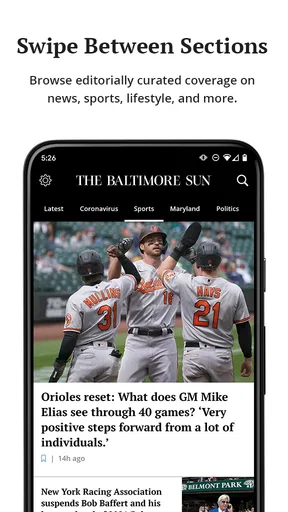
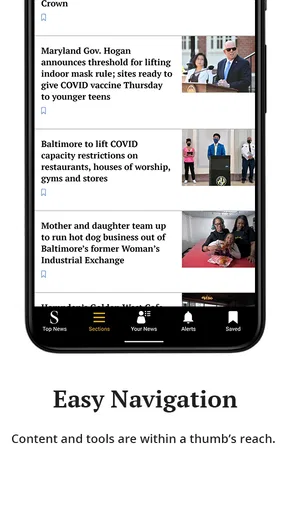
What really makes this app shine is its well-organized content. You can easily navigate through different sections such as politics, local news, sports, and entertainment. I particularly loved the ‘Breaking News’ alerts. They pop up just when you need them, making sure you’re always in the loop.
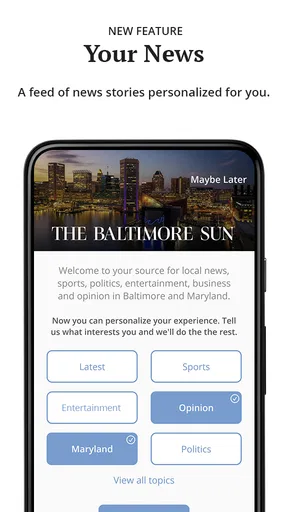
Another feature that caught my eye is the customization options. You can tailor the news feed to suit your interests, which is a great touch. It’s like having your own personal newspaper, minus the ink stains on your fingers!
Worth Reading Before You Choose

EA SPORTS FC Mobile 26 Is a Bigger Football Game, but It Takes Time

Flipboard Shows What News Apps Must Do Beyond the Feed

Switching to Android Auto Means Rethinking Your Driving Routine

Google Calendar Makes a Crowded Week Easier to Manage

Ludo King Makes the Most of the Minutes Between Plans

Baby Panda World Brings Quick Play to Modern Phones, but Its Game Library Feels Busy
The app also offers a subscription service. Now, I know what you’re thinking: another subscription? But trust me, the exclusive content you get access to is worth every penny. In-depth articles and investigative reports are just a tap away, providing a richer understanding of the stories that shape our world.
Using local coverage in an ordinary week
The strongest reason I see to keep a local paper app nearby is that local stories often become useful in small, practical ways. Imagine checking the news over breakfast before deciding what to discuss with a neighbor, then returning at lunch when a developing Baltimore story affects your commute or plans. A broad national feed may tell you the issue is happening; local reporting can give it a place and context. That is the kind of everyday usefulness I would look for here, rather than expecting every visit to deliver a major headline.
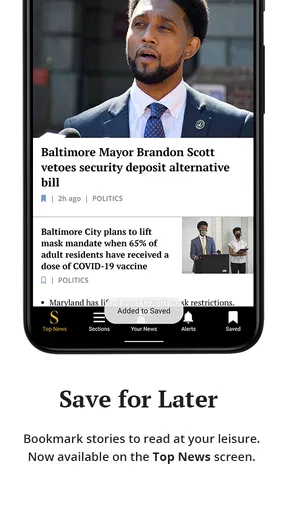
For a more deliberate routine, I would open the app once in the morning, scan the sections I care about, and save a longer read for a quiet moment rather than letting alerts interrupt the day. If breaking updates matter to you, alerts can help; if you find them distracting, treat them as optional and rely on a purposeful check-in instead. The trade-off is simple: quick notifications provide immediacy, while a scheduled visit gives you more control over when news enters your day.
Customization is most useful when it narrows the reading journey without narrowing your awareness too much. I would prioritize the topics I return to regularly, but still occasionally browse beyond them. A personalized feed can reduce the effort of finding local politics, sports, or entertainment, yet a reader who only follows a short list may miss a story outside those interests that later becomes relevant. Using the tailored feed as a starting point, not the whole paper, is a sensible balance.
How it fits beside other news sources
Compared with a general news aggregator, this app has a more specific center of gravity: Baltimore and the reporting associated with the newspaper. Aggregators are convenient when I want many publishers in one place or a fast overview of national and international headlines. A newspaper app makes more sense when I want a consistent local source and prefer to explore its own sections and editorial coverage. Neither approach is automatically better; they solve different reading needs.
It also differs from simply following headlines through social media. Social feeds can surface a story quickly, but the surrounding discussion and reposts can make it harder to find a clear, sustained account. A dedicated news app gives me a more focused place to read articles and opinions together. For international breadth, however, I would pair it with a broader outlet or aggregator, especially since the app’s local strength is not the same thing as comprehensive global coverage.
Readers comparing it with another local newspaper app should focus less on which interface looks tidier and more on which publication consistently covers the communities and subjects they care about. I would sample the free experience, note how often the app has relevant stories, and only then consider a purchase. That approach avoids paying for a familiar brand name when another source may better match your neighborhood, interests, or reading habits.
Performance and Usability
As far as performance goes, the app is pretty solid. It loads quickly, and scrolling through articles is as smooth as butter. I didn’t experience any crashes or annoying lags, which is a huge plus in my book. There’s nothing more frustrating than an app that freezes just as you’re getting to the good part of an article.
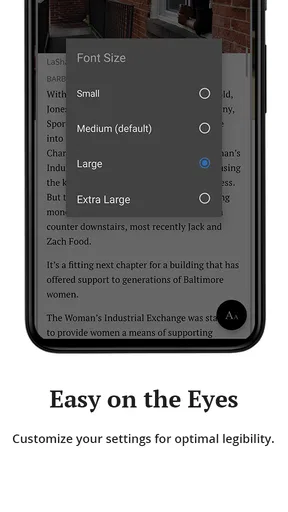
Usability-wise, it’s intuitive enough that even my not-so-tech-savvy friends would have no trouble navigating it. The fonts are readable, and the layout is clean and uncluttered, making for a pleasant reading experience.
Reading comfort, alerts, and practical trade-offs
For people who read in short breaks, a clear layout and easy section navigation matter because they reduce the time spent figuring out where a story lives. I would use the app for a quick scan while waiting for an appointment, then return to a longer article when I have enough time to follow the details. The advantage is having local news in a single, familiar place; the limitation is that a short visit cannot substitute for reading a complex story carefully.
Alerts deserve a little restraint. They are useful when a developing local event could change plans, but constant interruptions can make news feel more urgent than it is. I would keep notifications only if they help me act or understand something promptly, and otherwise check the app at times I choose. This is a practical way to benefit from breaking coverage without turning every update into a demand for attention.
The app is designed for a broad audience: its content rating is Everyone, and it is available for devices running Android 8.0 or later. Tribune Publishing Inc. is the developer. The current version is 10.0.52, and the app has been available since January 18, 2011. Those details make it easier to judge basic compatibility and background, but the more personal test is whether its local reporting earns a place among the sources you already use.
What Could Be Better?
Now, no app is perfect, and while the Baltimore Sun app is pretty impressive, there are a couple of things that could use a little tweaking. For starters, the ads. I get it, they need to make money, but sometimes they can be a tad intrusive. A more seamless integration would be a welcome improvement.
Also, while the app is great for local news, I felt it could offer a bit more variety in its international coverage. For someone who likes to keep tabs on global events, a broader scope would be a fantastic addition.
Who is likely to get good value?
I would recommend trying it if you live in or care about Baltimore, follow local developments, or want a newspaper-centered source for a mix of local news, sports, politics, and opinion. It may also suit someone who enjoys reading a publication’s editorials alongside reported stories rather than assembling every item from separate sources. The free download lets you judge the fit before making a paid commitment, which is useful when you are not sure how often you will open it.
I would be more cautious if your main need is international coverage, a wide range of publishers in one feed, or news without advertising. The app may not be the best single source for those priorities. Its average rating is 2.7 from around 400 ratings, with over 150 written reviews, and it has more than 50,000 installs. I treat those figures as a reason to assess the experience for myself, not as proof that it will or will not suit me; individual expectations about local coverage and subscriptions can differ sharply.
A useful decision is to ask yourself what would make the app worth returning to next week. Is it a local story you would otherwise miss, a section you check regularly, or a longer piece that gives you more context? If you cannot name a recurring need, the free install may still be worth a look, but a paid option is harder to justify. If local reporting regularly informs your conversations or choices, the value can be more concrete.
Final Thoughts
All in all, the Baltimore Sun app is a solid choice for anyone looking to stay informed about what’s happening in Baltimore and beyond. With its user-friendly design, customizable features, and reliable performance, it’s definitely worth checking out.
So, if you’re ready to dive into a world of news that’s both engaging and enlightening, give the app a try. Who knows, it might just become your new go-to source for all things newsworthy!
My buy-or-skip verdict is to start with the free download and judge it by the stories you actually read, not by a promise of broad coverage. If Baltimore reporting is central to your routine, and the specific paid access shown in the app feels worthwhile after you have explored it, a subscription may make sense. If you mainly want global headlines, an aggregator or international outlet is likely a better companion. For a reader who wants one focused local source, the app is worth trying; for everyone else, it is best treated as a useful specialist rather than an all-purpose news solution.
Pros
- Comprehensive local news coverage.
- User-friendly interface design.
- Real-time news alerts available.
- Customizable news categories.
- Offline reading mode supported.
Cons
- Frequent ads interrupt reading.
- Limited international news focus.
- Requires subscription for full access.
- Occasional app crashes reported.
- Lack of dark mode option.
FAQs for Baltimore Sun
What is the Baltimore Sun app used for?
The Baltimore Sun app is designed to provide users with the latest news, sports updates, weather forecasts, and other important information from the Baltimore region. It allows users to stay informed about local events and developments, offering a convenient way to access the content directly from their mobile devices.
Is the Baltimore Sun app available for both Android and iOS devices?
Yes, the Baltimore Sun app is available for download on both Android and iOS platforms. Users can easily find it on the Google Play Store for Android devices and the Apple App Store for iOS devices, ensuring accessibility for a wide range of smartphones and tablets.
Does the Baltimore Sun app offer a subscription service?
The Baltimore Sun app provides both free and subscription-based content. While some articles and features are accessible for free, a subscription may be required to unlock premium content, exclusive stories, and ad-free browsing. Users should check the app for current subscription details and pricing options.
Can I customize notifications in the Baltimore Sun app?
Yes, the Baltimore Sun app allows users to customize their notification preferences. You can choose to receive alerts for breaking news, sports updates, weather alerts, and more. This ensures that you only receive the information that is most relevant to you, without unnecessary interruptions.
How often is the content updated in the Baltimore Sun app?
The content in the Baltimore Sun app is updated frequently throughout the day. This includes real-time news updates, live sports scores, and weather forecasts. The app is designed to keep users informed with the most recent and relevant information as it happens, making it a reliable source for staying updated.


